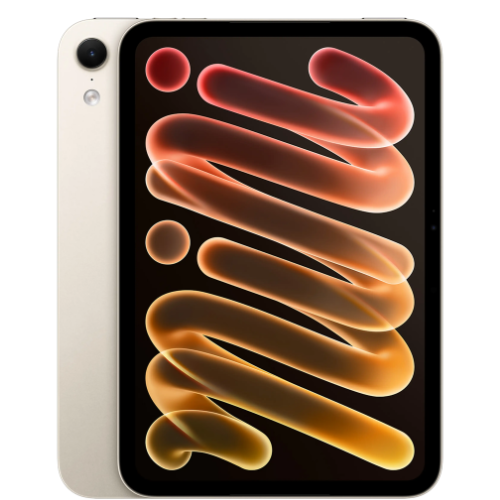
iPad Mini 8 (2026) cases
You choose an iPad Mini 8 2026 case in the style that suits how you use your tablet, with a fit tailored to the 8.5-inch screen. You can choose from wallet cases, back covers, shockproof phone cases, leather phone cases, and transparent cases. A cover with a front flap protects the screen in your bag. A back cover keeps the front accessible for immediate use on the sofa or at the table. For school or on the go with children, a childrens tablet case with thick edges is a sensible choice. If you type a lot for work or study, consider a keyboard cover. The iPad Mini 8 2026 supports a stylus. If you carry a pen, opt for a tablet case with a pen holder and check that your pen fits. A screen protector helps reduce scratches on the screen. Order from directcases.com.
-
Over 48,000 products60 days right of withdrawal
iPad Mini 8 2026 case and more: what you'll find here
For your iPad Mini 8 2026 case, you can choose here from wallet cases, back covers, heavy duty cases, kids cases, keyboard cases and screen protectors. Each type suits a different use. The iPad Mini 8 (2026) was announced on 26 October 2026. It is a compact tablet with an 8.5-inch Super Retina XDR OLED display and an aluminium and glass body. You can choose between the colours Midnight and Starlight. Weighing 255 grams and measuring 5.4 millimetres in thickness, it is easy to carry with you. Inside, it runs on the Apple A20 Pro chip. Because buttons, cameras and edges differ per model, only a model-specific cover provides an exact fit.
Typing and emailing on the iPad Mini 8 2026
Do you often type longer texts, such as emails or notes for school? Then a keyboard case is well worth considering.
- Work and study: keyboard covers turn your tablet into a compact workstation.
- Detachable or integrated keys: opt for a removable keyboard if you also frequently use the tablet handheld.
- Children: childrens tablet cases are an ideal alternative if the tablet is mainly used for games and videos.
Prefer a slim case without keys? Then take a look at the iPad Mini 8 2026 wallet cases or back covers.
Heavy duty protection for school and on the go
A heavy duty protective case absorbs impacts from table drops or inside a packed school bag. Such cases feature reinforced corners and a sturdy edge around the screen. Choose one if the tablet is often passed around. That extra layer also helps reduce damage during intensive use in the classroom or at work. Check out the iPad Mini 8 2026 heavy duty cases for models with a raised bevel or an integrated stand. A thicker case does add bulk and weight. If you primarily want to keep the tablet sleek, a slim back cover is a better fit. Choose heavy duty if there is a higher chance of drops, and slim if the tablet is mostly used at home on the sofa.
Comparing materials of an iPad Mini 8 2026 case
The material determines how a case feels, wears and looks. Each material offers its own benefits.
- Silicone and TPU: flexible, non-slip in the hand and shock-absorbing.
- Faux leather and leather: sophisticated look, often found on wallet cases for work.
- Polycarbonate: rigid and slim, commonly used in hard back covers.
- Transparent: shows off the colour of your tablet.
Over time, leather develops its own unique patina. You can find this classic look among the leather cases. If you want to keep Midnight or Starlight visible, select from the iPad Mini 8 2026 transparent cases. Clear TPU can yellow slightly over extended periods. An anti-yellowing design helps to counter this.
Writing and drawing with a stylus
The iPad Mini 8 (2026) supports a stylus, so the case shouldn't get in the way of your writing. When choosing, look for an open side or a cutout where your pen can stay in place. A front cover that folds flat behind the tablet provides a stable writing angle. Some cases feature a dedicated loop or slot for a pen; check that the holder matches your stylus. If you write a lot, a matte screen protector helps adjust the pen's glide resistance. You'll find these options among our screen protectors, with tempered glass and protective films available.
How to filter the right case
Start by filtering by type, then narrow down by material and colour. This quickly gives you a tailored shortlist. Next, consider features that match your routine, such as a stand for watching videos, an auto wake/sleep function via the cover, or a carry handle for children. For every tablet case, check that cutouts for buttons, camera, and the charging port are precision-matched to this model. Keep the charging port easily accessible. Fast charging operates via cable, so an open port prevents having to remove the case repeatedly.
Order your iPad Mini 8 2026 case
Choose a cover tailored to your use, from a slim back cover to a keyboard case. At directcases.com you benefit from 60-day returns, giving you plenty of time to see if your choice suits you.
Frequently Asked Questions
Apple iPad Mini 8 (2026) specifications
| Model number | A3596, A3597 |
|---|---|
| Dimensions | 195.3 × 132.6 × 5.4 mm |
| Weight | 255 gram |
| Screen size | 8.5 inch |
| Screen type | Super Retina XDR OLED, 600 nits (typ), 1200 nits (HBM) |
| Fingerprint sensor | Yes |
| Housing material | aluminum, glass |
| Colours | Midnight, Starlight |
| Dust and water resistance | IP67 |
| Battery | 4900 mAh |
| Wireless charging | no |
| Fast charging | yes |
| Charger included | no |
| Headphone jack | no |